
Can you get Jenny Mod on iPhone? The honest answer is: not the way you can on Android. iPhones cannot install APK files or Java mods, and there is no Jenny Mod app on the App Store. But iPhone players are not completely out of luck — there is one real way to play Jenny Mod on iOS, using Minecraft Bedrock and an addon file. This guide explains what works, what does not, and the traps to avoid.
If you only want the short answer: install Minecraft Bedrock from the App Store, get the Jenny Mod .mcaddon file, and import it through the Files app. The steps are below. Everything else on this page is about doing that safely, without falling for fake apps or paid scams.
Table of Contents
The Short Answer
Jenny Mod on iPhone — the facts
- No APK: APK files are Android-only and do nothing on an iPhone.
- No App Store app: there is no official Jenny Mod app. Apps using the name are wrappers.
- No jailbreak needed: the working method runs on a normal iPhone.
- The real method: Minecraft Bedrock (from the App Store) + the Jenny Mod .mcaddon file, imported through the Files app.
Why iPhone Is Different From Android
On Android, you can download a file and open it with whatever app you like — that is why the .mcaddon install is one tap. iOS does not work that way. Every app on an iPhone runs in its own sandbox: apps cannot install each other's files, and there is no way to sideload a .jar mod or an APK. Apple also does not allow mod-installer apps on the App Store.
But Minecraft on iOS is Bedrock Edition, and Bedrock has a built-in addon system. Addons are data files that Minecraft itself imports — and iOS lets you hand a file to Minecraft through the Files app. That one opening is what makes Jenny Mod possible on iPhone at all. It is the same addon Android players use, imported a slightly different way.
The One Real Way: Bedrock Addon Import
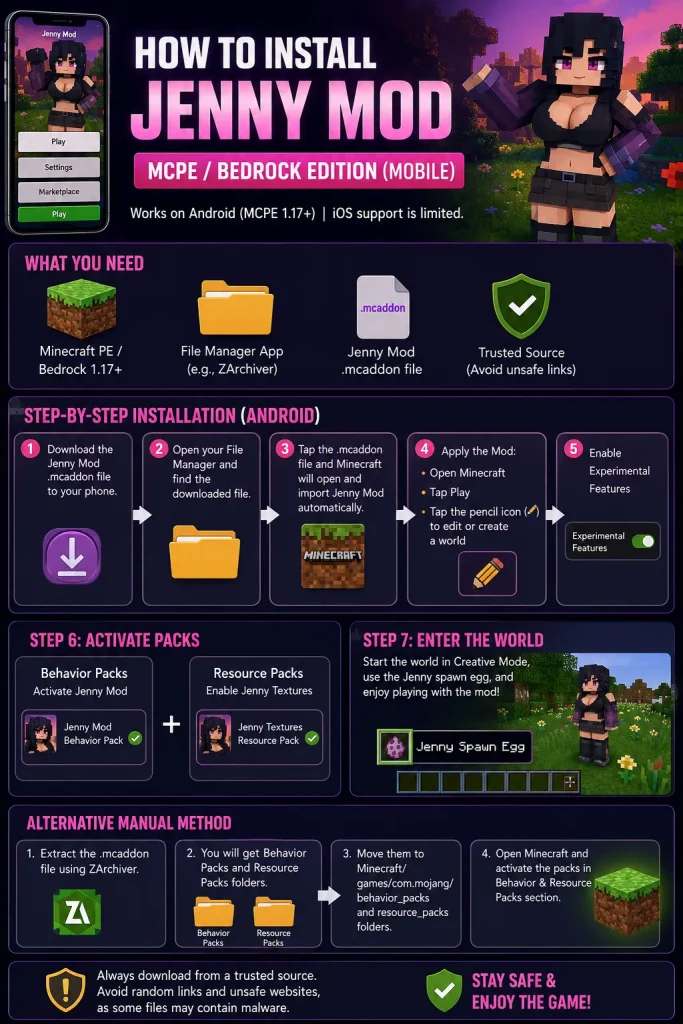
The Jenny Mod addon built for MCPE and Bedrock is a single .mcaddon file. It works on any device running Minecraft Bedrock — Android, Windows, and iOS. On iPhone you need three things: an iPhone with Minecraft Bedrock installed from the App Store, the .mcaddon file, and the Files app (which comes with every iPhone). The addon supports Bedrock versions 1.17.0 through 1.21.71 — check your Minecraft version in the game settings before you start.
How to Import the Addon on iOS
Step 1: Get the .mcaddon File
- Download the Jenny Mod .mcaddon file on your iPhone
- Save it to the Files app — Downloads, or iCloud Drive if you prefer
- Do not rename the file. It must keep its .mcaddon ending for Minecraft to recognise it
Step 2: Tap the File to Import It
- Open the Files app and find the .mcaddon file
- Tap it — Minecraft should open and import the addon automatically
- If nothing happens, long-press the file, tap Share, and choose Minecraft
- Wait for the Import successful message
Step 3: Activate the Packs in Your World
- In Minecraft, tap Play
- Tap the pencil icon to edit a world, or create a new one
- Open Behavior Packs and activate Jenny Mod
- Open Resource Packs and enable Jenny Textures
- Turn on Experimental Features if the game asks for them
- Start the world in Creative Mode and use the Jenny spawn egg
If the addon does not appear: check your Minecraft Bedrock version is between 1.17.0 and 1.21.71, re-download the file (it may have downloaded incompletely), and restart Minecraft before trying again.
What Doesn't Work on iPhone
Most “Jenny Mod for iOS” results are traps. Here is what to avoid:
- “Jenny Mod APK” files: APKs are Android packages. They cannot run on iOS at all.
- “Jenny Mod IPA” downloads from random sites: unverified, often bundled with junk, and Apple blocks unsigned IPA files anyway.
- App Store apps charging for “Jenny Mod”: these are wrapper apps, not the mod. Jenny Mod is free — do not pay for it.
- Jailbreaking: not needed for the addon method, and it removes the security protections on your phone. Do not jailbreak for a mod.
- Sites asking you to complete surveys or install a profile: scams. A real .mcaddon file is a direct download — it never asks you to install anything else first.
Alternatives If iOS Doesn't Work Out
If the addon route gives you trouble on your iPhone, the mod itself is still available on other devices. On PC, the Java Edition build for Minecraft 1.12.2 with Forge is the fullest version of Jenny Mod — see our PC install guide. On Android, the same .mcaddon file imports with one tap — see our MCPE guide. And if you play on more than one device, your Bedrock worlds travel with your Microsoft account, so progress made on PC or Android is not lost.
One more thing: Jenny Mod includes mature content meant for adults. If you are a parent checking this for a child, read our age guide first.
Next step: Download Jenny Mod for Minecraft — get the .mcaddon file for Bedrock and MCPE, then follow the iOS import steps on this page.
Frequently Asked Questions FAQS
Can I download Jenny Mod on iPhone?
There is no iPhone download in the Android sense — no APK and no app to install. The working method is importing the Bedrock .mcaddon file into Minecraft for iOS, as explained in the steps above.
Is there a Jenny Mod app on the App Store?
No. Apps using the Jenny Mod name on the App Store are wrapper apps — they are not the mod itself. Do not pay for them.
Do I need to jailbreak my iPhone?
No. The Bedrock addon import works on a normal, non-jailbroken iPhone. Jailbreaking is not needed and we do not recommend it for this.
How do I import the .mcaddon on iOS?
Save the .mcaddon file to the Files app, tap it, and Minecraft will open and import it. Then open your world settings, activate the Jenny Mod behavior pack and the Jenny Textures resource pack, and start the world.
Why won't the addon load on my iPhone?
Usually a version mismatch or an incomplete download. Check that your Minecraft Bedrock version is between 1.17.0 and 1.21.71, re-download the file, and restart Minecraft before trying again.
Is Jenny Mod free on iOS?
Yes, the mod itself is free. You only pay for Minecraft itself, which you buy once from the App Store. Any app or site charging separately for Jenny Mod is not selling you the real thing.
Conclusion!!
Jenny Mod on iPhone is possible, but only one way: Minecraft Bedrock from the App Store plus the .mcaddon addon, imported through the Files app. There is no APK, no App Store app, and no jailbreak involved — and anything promising those things is not the real mod.
Import the file, activate both packs in your world settings, and you are playing. If it does not work, check your Bedrock version first — that is the cause almost every time.