
Jenny Mod 1.12.2 is the original build, written for Minecraft Java 1.12.2 with Forge 1.12.2 and Java 8. Later versions exist as community ports, but 1.12.2 has the fullest features and the longest track record, and it is the build our download page lists verified files for. This guide installs it from scratch in five steps, with a check at the end that proves it worked.
Table of Contents
What the 1.12.2 Build Is
The original Jenny Mod was written by SlipperyTum and later maintained by SchnurriTV, for Java Edition 1.12.2. As Minecraft moved on, community members ported it to newer versions, first 1.20.1 and then 1.21.1, but those ports are not the original release: different ports exist, their quality varies, and some miss features or crash with certain Forge builds. The 1.12.2 build is the one players come back to when a port gives them trouble, because it is the version with the most testing behind it.
Newer is not automatically better with this mod. If you already play on 1.20.1 or 1.21, use the port for your version. If you are setting up a fresh install just for Jenny Mod, 1.12.2 is the straightforward choice.
What You Need Before You Start
Four things, all free: Minecraft Java Edition with a 1.12.2 installation, Java 8, the Forge 1.12.2 installer, and the Jenny Mod .jar for 1.12.2. Back up any worlds you care about before changing your setup. And remember: Jenny Mod is free. Any site charging for a 1.12.2 file, a Forge installer, or an install tool is not selling you the mod.
Step 1: Install Java 8
Minecraft 1.12.2 runs on Java 8. If your computer already has a newer Java, that does not help this build: a 1.12.2 install launched with the wrong Java either refuses to start or crashes with a Java error. Install Java 8, then confirm it is the version your launcher will use for the 1.12.2 profile. The launcher default picks the Java that matches the Minecraft version, which for 1.12.2 is Java 8.
Step 2: Install Forge 1.12.2
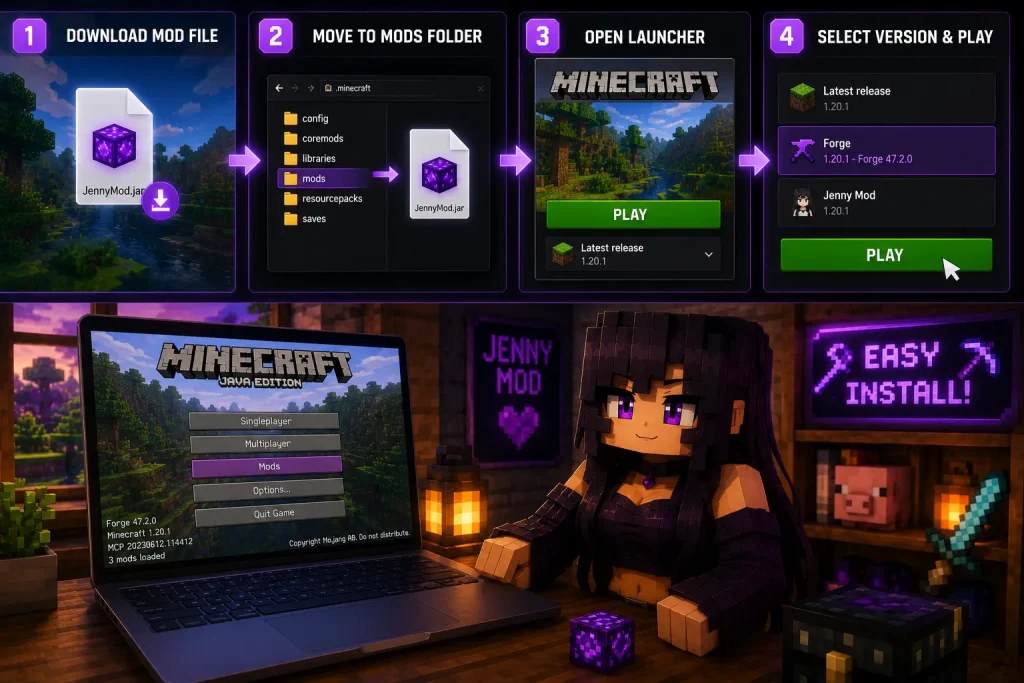
Download the Forge installer for Minecraft 1.12.2 from the official Forge site and run it. Choose Install Client, point it at your Minecraft folder, and let it finish. When it is done, open the Minecraft launcher: a new Forge 1.12.2 installation should appear in the installations list. Launch it once, let the game reach the title screen, then close it. That first launch creates the mods folder you need in the next step, and it proves Forge itself works before the mod is involved. If the Forge profile does not appear, the installer pointed at the wrong Minecraft folder: run it again and check the path.
Step 3: Get the Verified .jar File
Download the Jenny Mod .jar for 1.12.2 from a source you trust. The file is around 40-50 MB: a 2 MB file with the same name is not the mod. Our download page lists the verified 1.12.2 files. Scan the file with your antivirus, and check the file name states version 1.12.2. If a download asks for payment, a survey, or an account, close it: the mod is free, and those walls belong to fake reuploads.
Step 4: Put the .jar in the Mods Folder
Open your Minecraft folder and then the mods folder inside it. If there is no mods folder, you skipped the first Forge launch in step 2: launch the Forge profile once and it will appear. Copy the Jenny Mod .jar into the mods folder and leave it exactly as it is. Do not unzip it, do not rename it, and do not open it: Forge reads the .jar directly, and extracting it breaks it. If the release lists a second companion file, such as a model file, install that too, from the same release. Files from different releases do not mix.
Step 5: Launch and Check It Loaded
Launch Minecraft on the Forge 1.12.2 profile. On the title screen, open the Mods menu: Jenny Mod should be listed there. Then create a new test world and load it. If the world loads without crashing and the mod works in-game, the install is done. Only then add the mod to a world you care about, and only then add your other mods back, one at a time, so a conflict is easy to trace.
- Mods menu lists Jenny Mod: if it does not, the .jar is in the wrong folder, was unzipped, or you launched the vanilla profile instead of Forge.
- Test world loads: if the title screen works but a world crashes, suspect a missing companion file or a mod conflict.
- No crash on first play: a crash in the first minutes usually means a version or Java mismatch, not a broken mod.
If It Does Not Work
Do not start over from the beginning. Check the chain in order: Minecraft 1.12.2, Forge 1.12.2, Java 8, the .jar in the mods folder, the Forge profile launched. One of those five is wrong in almost every failed install. Our not working guide fixes each one in detail, including crashes on world load and the MCPE route if you would rather play on Android. And if you play with Fabric instead of Forge, read our Fabric install guide first: a Forge .jar will not load under Fabric at all.
One more warning: Jenny Mod includes mature content meant for adults. If you are a parent checking a download for a child, read our age guide first.
Next step: Download Jenny Mod for Minecraft - verified 1.12.2 Java files and the MCPE addon for Bedrock up to 1.21.71.
Frequently Asked Questions FAQS
What do I need to install Jenny Mod 1.12.2?
Minecraft Java Edition 1.12.2, Minecraft Forge 1.12.2, Java 8, and the Jenny Mod .jar file for 1.12.2. The .jar is around 40-50 MB. All four must match version 1.12.2: a 1.20.1 Forge or a different Java version will not run this build.
Do I need Forge to install Jenny Mod 1.12.2?
Yes. Forge 1.12.2 is the mod loader that runs the Jenny Mod .jar file on Java Edition. Without Forge, Minecraft has nowhere to load the mod from. Install Forge first, launch the Forge profile once so the mods folder is created, then add the .jar.
Which Java version does Jenny Mod 1.12.2 need?
Java 8. Minecraft 1.12.2 runs on Java 8, and using Java 17 with this build is a common reason the game will not start. Newer ports for 1.20.1 and 1.21 need Java 17 instead, so match the Java to the version you are installing, not to the newest release.
Where do I put the Jenny Mod .jar file?
In the mods folder inside your Minecraft folder, after launching the Forge 1.12.2 profile once. Do not unzip the file: keep it as a .jar. Then launch the game on the Forge profile, and Jenny Mod should appear in the Mods menu on the title screen.
How do I know Jenny Mod 1.12.2 installed correctly?
Three checks: Jenny Mod appears in the Mods menu, the game loads a new test world without crashing, and the mod works in that world. If any fail, the version, Java, folder or file is wrong: see our not working guide.
Is Jenny Mod 1.12.2 better than the 1.20.1 and 1.21 ports?
For stability, yes. The 1.12.2 build is the original, written for Java 1.12.2, with years of community testing behind it. The 1.20.1 and 1.21 builds are community ports, not the original release, and their quality varies. If you play on a newer version already, use the port for that version; if you are choosing a version, 1.12.2 has the fewest surprises.
Conclusion!!
Jenny Mod 1.12.2 on Forge is a five-step install: Java 8, Forge 1.12.2, the verified .jar, the mods folder, and a launch check on the Forge profile. Match every version to 1.12.2, keep the .jar intact, and back up your worlds first. For newer versions, see our 1.20.1 guide and 1.21 guide; for Android, see our MCPE guide.